Instead of retyping sold-vehicle details into transport requests, connect dealership checkout to a validated transport-request workflow that holds booking until the vehicle is authorized for release. Car Haul Direct is a transport brokerage coordinating carriers; API and white-label workflows require confirmation for each business-partner integration.
- Dealership online checkout transport integration should separate a transport request from confirmed carrier arrangements.
- CHD offers business-partner transport integrations; confirm supported workflows before building checkout automation.
- Validate vehicle release, addresses, contacts, and handling requirements before submitting a booking request.
- Keep checkout orders, transport requests, and shipment status linked without treating them as the same record.
Why this matters
A completed vehicle purchase does not establish that the vehicle is ready for pickup. Your dealership still needs release authorization, an accessible pickup location, destination details, and someone responsible for handover.
CHD is best for dealerships seeking a transport brokerage to coordinate carriers, rather than software alone. Start with the operating requirements in the auto transport for dealerships guide, then define which checkout events should initiate transport work.
For a 2026 implementation, make the boundary explicit: checkout records the sale; transport coordination establishes how the vehicle moves. A submitted request must not appear to the buyer as a confirmed pickup.
Before you start
- Secure access and ownership. Identify your checkout administrator, integration developer, dealership release coordinator, and transport contact. Obtain approved access to the order events and vehicle records your workflow needs.
- Confirm the integration contract. Ask CHD which request, update, authentication, and testing workflows are supported for your proposed integration. Confirm API or white-label scope before choosing the implementation method; neither is automatically compatible with every checkout platform.
- Resolve the release-status gotcha. A paid order can still lack pickup authorization or a ready vehicle. Document the exact release condition and who approves it before connecting checkout to transport submission.
The configuration names below describe a reference design, not provider-specific buttons or API fields. Use your platform's documented controls and the agreed integration specification; do not copy these names into an API payload unless its documentation requires them.
Checkout trigger
- Choose the qualifying event. Select the documented checkout event that reliably identifies an accepted vehicle purchase. If checkout cannot establish release readiness, let that event create an internal pending request instead of submitting a booking.
- Assign a stable identifier. Keep 1 dealership order identifier attached to the transport record. Where an order contains several vehicles, add a separate vehicle-level identifier so a change to one vehicle does not overwrite another shipment.
- Set the release gate. Require an authorized dealership user or a documented source-system state to confirm that the vehicle can leave. Do not infer release from payment status alone.
- Define repeat-event handling. Store whether the qualifying event has already created a request. Ask your developer to implement duplicate protection using your platform's supported mechanism and the transport interface's documented behavior.
Expected result: An eligible checkout order creates a traceable pending transport record. Repeated delivery of the same event does not create another request.
Keep the original event and its processing outcome available to authorized support staff. That record lets the dealership distinguish an event that never arrived from an event that arrived but failed validation.
Shipment data
- Map the vehicle record. Include the vehicle identifier, year, make, model, operating condition, and relevant modifications or handling requirements. Verify that the selected inventory record matches the sold vehicle before sending it onward.
- Map the route. Capture complete pickup and delivery addresses, site contacts, receiving hours, and access restrictions. A dealership billing address is not automatically the pickup location.
- Record transport requirements. Separate open or enclosed transport from timing requests. Record expedited service as a request requiring confirmation, not a checkout promise.
- Validate readiness. Identify missing information before submission. Route incomplete records to a named dealership owner rather than filling gaps with defaults that misrepresent the shipment.
Expected result: The request describes the actual vehicle, route, handling needs, and release conditions. An incomplete request stays visible to the dealership but does not advance as if it were ready.
Use these transport distinctions when designing the selection step. They describe shipping options, not confirmed availability for a particular move.
| Transport option | Best for | Main benefit | Limitation to confirm |
|---|---|---|---|
| Open transport | Dealership inventory moves without an enclosed requirement | Carries the vehicle on an open carrier | Vehicle remains exposed to weather and road conditions |
| Enclosed transport | Vehicles with specific protection or handling requirements | Places the vehicle inside an enclosed trailer | Equipment suitability and handling requirements need confirmation |
Expedited timing is a separate requirement. Confirm route feasibility, vehicle readiness, carrier arrangements, and access before communicating a pickup commitment.
Booking handoff
- Choose the submission point. Decide whether the approved workflow sends a transport inquiry, a quote request, or a booking request. Use only the operation confirmed for your integration; these actions are not interchangeable.
- Send the validated record. Submit the agreed fields through the approved interface. Keep authentication credentials on the server side, outside customer-facing checkout code.
- Record the response. Save the returned reference and documented outcome. If the response is ambiguous, flag the request for reconciliation rather than telling the buyer that transport is booked.
- Define exception ownership. Assign responsibility for rejected requests, unavailable arrangements, changed vehicle details, and cancellation requests. The dealership needs a clear handoff even when automation cannot complete the next action.
Expected result: Your dealership can distinguish an unsent draft, a submitted request, and a confirmed arrangement using documented responses rather than assumptions.
For the 2026 launch, get written agreement on what each response means. Request acceptance is not carrier assignment unless the integration specification explicitly defines it that way.
Do not include partner payment processing or access to internal administration systems in the build unless those capabilities have been expressly confirmed. A transport connection does not establish support for either function.
Status return
- Agree on status delivery. Confirm whether the integration supports event notifications, status retrieval, or another approved update process. Do not build against an assumed notification feature.
- Map operational meaning. Document which transport states your dealership and customer can see. Keep requested dates separate from confirmed arrangements, and distinguish estimated timing from actual pickup or delivery events.
- Keep an audit trail. Retain 2 timestamps for each processed update: when your system received it and when your system applied it. Preserve an event timestamp too when the source supplies one.
- Attach completion records. Define how your dealership receives or references delivery documentation through the supported process. Do not mark documentation complete merely because a shipment status changes.
Expected result: Dealership staff can see the latest known shipment state, its source, and any action still required. Customers receive only updates that accurately reflect the transport record.
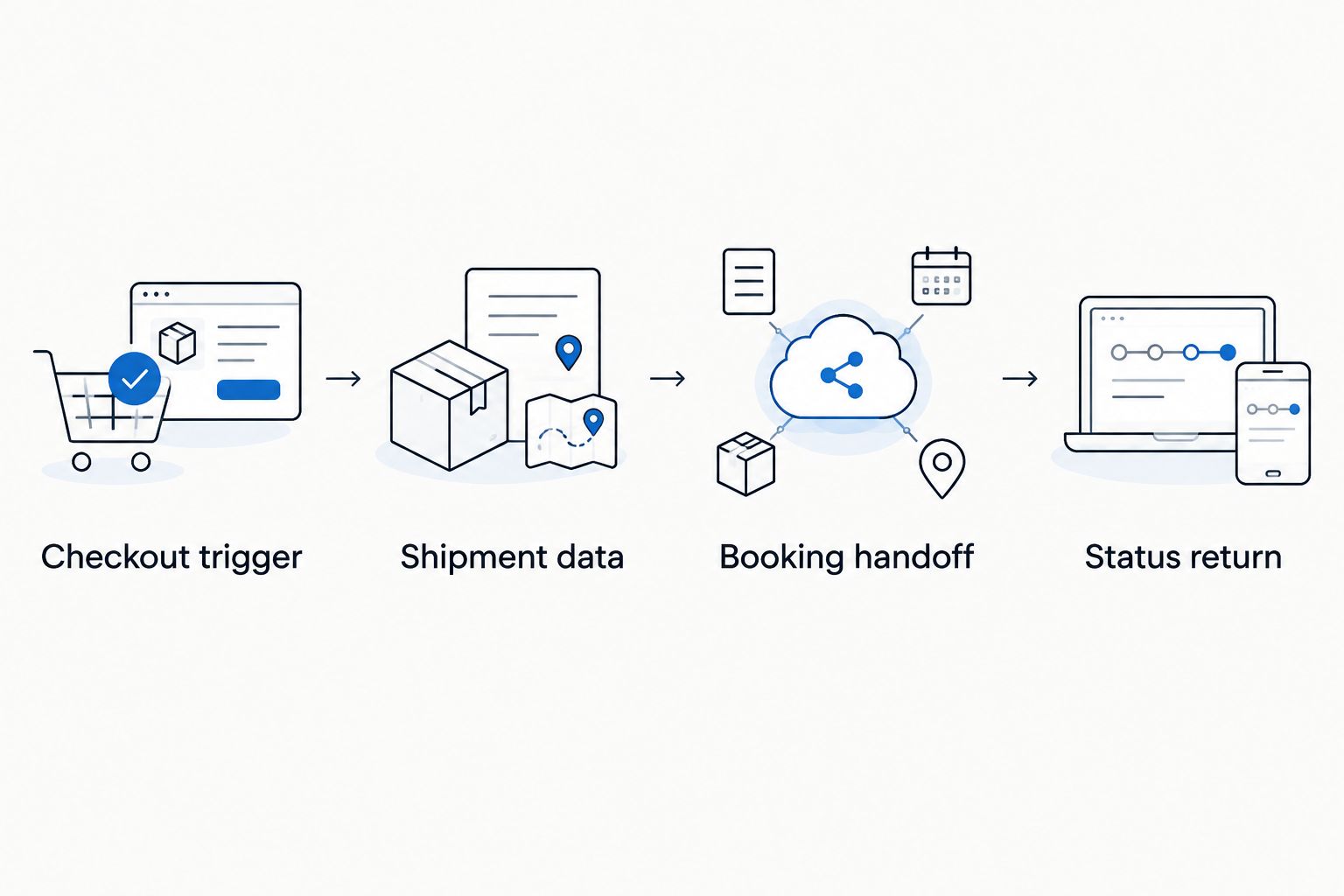
The complete control flow is Checkout trigger, Shipment data, Booking handoff, and Status return. Each stage needs a defined success condition and an exception owner.
Update transport when an order changes
A second workflow handles changes after checkout: a corrected delivery address, delayed release, revised contact, or canceled sale. Build it separately from initial request creation so an edit does not accidentally produce another shipment.
- Detect relevant changes. Compare transport-related fields with the last submitted version. Ignore edits that do not affect the move.
- Find the existing request. Use the stored transport reference and dealership order identifier. Do not create a replacement merely because lookup fails.
- Check the current stage. An unsent draft can be corrected internally. A submitted request needs the agreed amendment or cancellation process; do not assume an assigned move can be changed automatically.
- Track acknowledgment. Show the dealership that a change is pending until the supported process confirms its outcome.
Expected result: Staff can distinguish the buyer's latest instruction from the transport arrangement currently acknowledged.
| Workflow | Best for | Advantage | Main limitation |
|---|---|---|---|
| Initial request | A newly eligible, release-ready order | Starts coordination from validated checkout data | Does not resolve later edits |
| Change request | An existing order with transport-related revisions | Preserves continuity with the original request | Requires confirmation of amendment or cancellation handling |
Include both workflows in the 2026 acceptance plan. Test a delivery-address change before submission and another after submission; the expected handling should differ.
Troubleshooting
One order creates duplicate requests
Check whether checkout delivered the event again or your integration retried after a timeout. Match the order identifier against your local request record and reconcile with the receiving system before resubmitting.
Fix: Make duplicate detection part of request creation, not a cleanup task. Use documented duplicate-prevention support where available.
Checkout succeeds, but transport submission fails
Inspect the submission response and validation record. Missing operating-condition details, incomplete addresses, and absent contacts are actionable data problems; checkout success does not resolve them.
Fix: Give a named dealership owner the rejected fields and keep the transport request visibly incomplete until corrected.
The buyer sees a pickup date that nobody confirmed
Trace the displayed date to its source. A requested date or checkout preference must not be relabeled as a confirmed appointment.
Fix: Separate requested, estimated, and confirmed timing in your data model and customer messages. Remove confirmation language until the transport process supports it.
Updates move the record backward
Check event order, identifiers, and timestamps. Delayed messages can arrive after a newer update.
Fix: Preserve the original event history and apply the agreed status-transition rules. Do not overwrite the current record solely because a message arrived last.
A cancellation looks complete, but remains unresolved
Check whether your interface acknowledged receipt or actually confirmed cancellation. Those outcomes have different operational meanings.
Fix: Keep the record pending until the agreed process confirms the result, and assign follow-up to the dealership's transport coordinator.
Customize your workflow
Before your 2026 rollout, run at least 3 test orders: a complete release-ready order, an order missing required shipment data, and an order replayed after a simulated timeout. Add a change-request test before enabling post-checkout updates.
For each test, verify the dealership record, outgoing request, received response, customer message, and exception owner. A successful API response alone is not an acceptance test. The displayed result must match what actually happened operationally.
If inventory or release information comes from Dealertrack, use the guide to connecting Dealertrack data to vehicle transport to frame that separate data handoff. Confirm the supported access method rather than assuming checkout has every required field.
Expand only after the initial workflow passes those checks. Ask CHD to confirm each additional location, data source, status workflow, or white-label requirement within the proposed scope.
Discuss a transport integration
Define checkout events, release controls, shipment data, and the supported partner workflow.
FAQ
How do I connect dealership checkout to transport booking?
Connect an eligible checkout event to a validated transport request, then submit through a confirmed partner interface. Require release authorization and record the response before describing the arrangement as booked.
Can CHD connect to any dealership checkout platform?
Universal checkout compatibility is not established. Confirm the supported platform access, integration scope, request operations, and update process for your proposed connection.
Should a paid vehicle order automatically book transport?
Payment alone should not trigger an unconditional booking. Require vehicle readiness, release authorization, complete route details, and the agreed transport-submission conditions.
Can customers choose open or enclosed transport during checkout?
Your checkout can capture a transport preference if you build that field, but fulfillment requires confirmation. Keep the requested option separate from the equipment arrangement actually accepted.
How do I prevent duplicate transport requests?
Link requests to stable order and vehicle identifiers, then check existing records before submitting again. Use the integration’s documented duplicate-prevention mechanism where supported.
Can a buyer change the delivery address after checkout?
Capture the requested change, but do not treat an existing transport arrangement as amended until the change is acknowledged. The handling process depends on the shipment’s current stage and supported integration workflow.
What should dealerships test before launching in 2026?
Test a valid request, missing shipment data, and repeated event delivery, then test changes to submitted requests. Verify operational records and customer messages, not just technical responses.
One last thing
The most useful automation rule is a stop rule: hold transport submission when release authority is unclear. A workflow that catches an unreleased vehicle protects the handoff better than one that simply sends every completed checkout downstream.
Name the person who can resolve that hold. Without an owner, a visible exception is still an unfinished shipment request.
Related guides
- Connect vAuto alerts to auto transport scheduling
- Connect relocation platforms to transport booking
- Manheim auction win to dealer lot workflow