Instead of retyping routes, vehicle details, transport types, and timing needs from Dealertrack into shipment requests, scope a dealertrack vehicle transport integration that transfers approved data into a transport review queue. Car Haul Direct is a transport brokerage coordinating carriers; confirm the supported connection, permissions, and shipment workflow before enabling any automated handoff.
- A Dealertrack vehicle transport integration needs approved data access and a defined shipment approval gate before automation.
- CHD vehicle transport coordination fits dealer teams needing carrier coordination alongside a separately scoped data connection.
- Keep inventory changes separate from dispatch authorization; a vehicle record alone does not establish pickup readiness.
- Confirm status exchange and delivery documentation separately rather than assuming every workflow supports both.
Why this matters
Connecting dealership data to transport is not simply moving a VIN between systems. Your shipping team also needs the correct pickup location, release instructions, vehicle condition, receiving contact, and transport requirements.
CHD vehicle transport coordination is best for dealer teams that need carrier coordination alongside a separately scoped data connection. For the operating process behind that connection, start with the auto transport guide for dealerships.
For your 2026 implementation, separate data transfer from shipment authorization. A successful transfer means the receiving workflow accepted information; it does not establish that a carrier is assigned or that the vehicle is ready for collection.
Before you start
- Confirm authorized access. Identify your Dealertrack product, dealership account owner, and authorized technical contact. Ask which data-access method and permissions are approved for your specific environment before choosing an integration design.
- Prepare the operating rules. Name the person who approves transport, the pickup and receiving contacts, and the developer responsible for the connection. Bring a sample shipment record containing only information authorized for the project.
- Resolve the hidden blocker: vehicle release. An inventory record is not pickup authorization. Establish how the workflow verifies release instructions, keys, location, operating condition, and access restrictions before requesting carrier coordination.
Treat this as a configuration and acceptance guide, not a list of Dealertrack menu clicks. Use the actual field names and controls in your approved interface; the mapping labels below describe your transport requirements, not claimed Dealertrack screen labels.
Source access and shipment eligibility
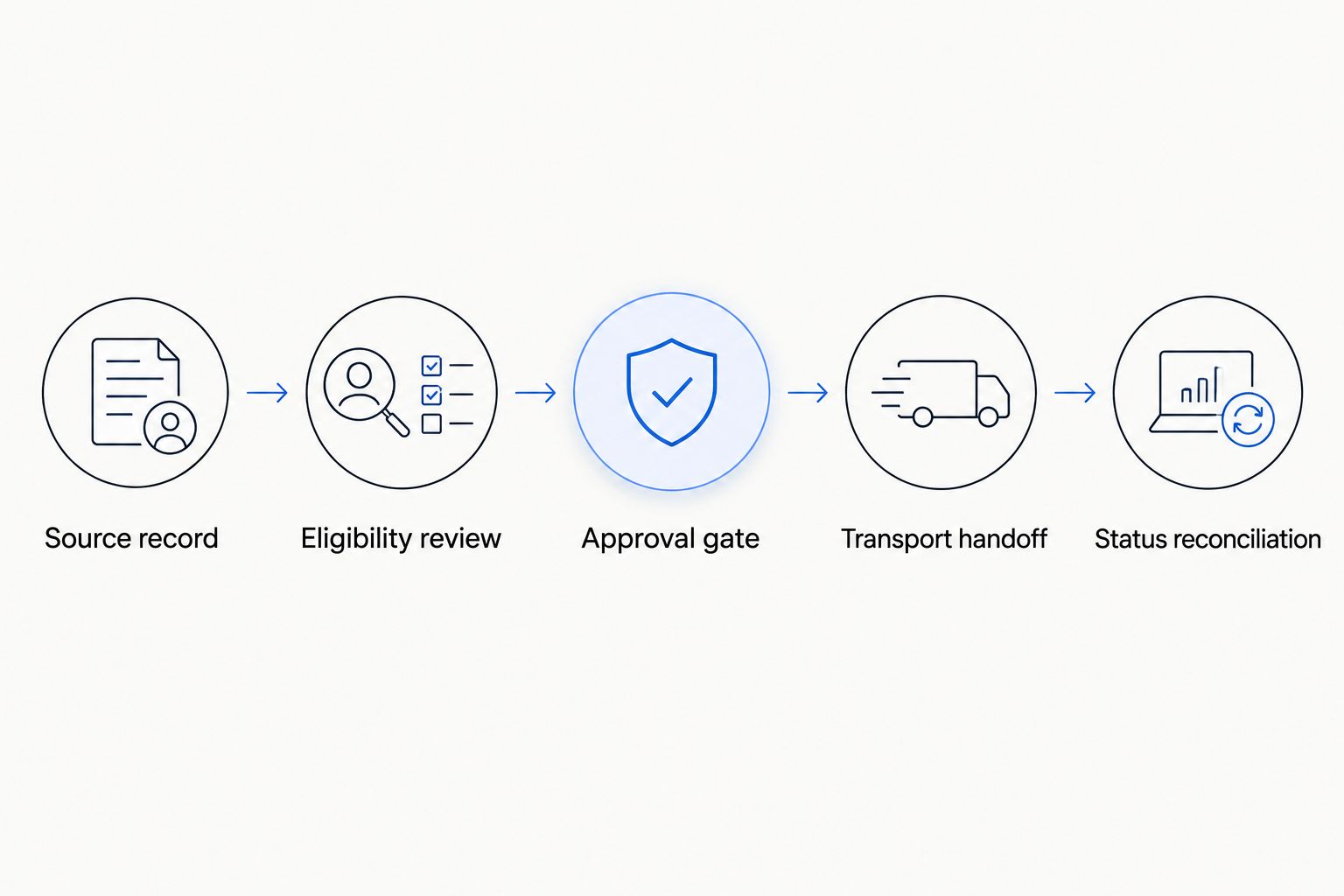
The first configuration unit defines which records enter the transport process. Start with the business event, then confirm whether your authorized interface can represent it.
- Choose the initiating event. Specify the event your team wants to act on, such as an approved dealer trade or an auction purchase cleared for transport review. Do not assume every inventory addition requires shipping.
- Confirm the transfer method. Ask your Dealertrack contact and implementation team to approve the available interface and its permitted use. Confirm the receiving workflow with CHD separately; do not assume a prebuilt connector exists.
- Identify the source record. Carry the authorized source reference into your internal shipment record. Add a transport request reference so staff can distinguish the vehicle record from the movement request.
- Define eligibility. Require an origin, destination, vehicle identity, transport preference, timing need, and approval owner. Route incomplete records to review rather than treating them as shipment instructions.
- Assign exception ownership. Name the person who resolves missing releases, conflicting destinations, or unclear vehicle condition. A queue without an owner is an unfinished process.
Expected result: An eligible record creates a reviewable transport request, not an assumed booking. Your operator can identify its source and explain why it entered the queue.
For the 2026 launch, document this rule in plain language: only the authorized business event starts a request. Later inventory edits must follow a separate change process.
Shipment mapping and approval rules
Build a mapping sheet before development. For every transport requirement, record the authorized source field, transformation rule, validation rule, and person responsible when the information is absent.
- Map vehicle identity. Include the VIN and useful vehicle descriptors. Keep stock references as supporting identifiers rather than relying on a stock number alone to match vehicles across locations.
- Map the route. Separate the pickup address from the dealership's billing or mailing address. Record the receiving location and contacts independently.
- Map handling requirements. Capture whether the vehicle runs, rolls, steers, and brakes, plus disclosed modifications or clearance concerns. Confirm special loading needs instead of inferring them from the model name.
- Map transport preference. Record the requested transport type and any timing priority. Treat expedited handling as a request subject to confirmation, not an automatic pickup commitment.
- Add the approval gate. Require the designated approver to review the route, readiness, handling requirements, and timing before the request advances to carrier coordination.
Expected result: The review screen or approved handoff contains enough information for a transport discussion without exposing unrelated customer or deal information.
Transport preferences to capture
These are service choices to discuss, not settings proven to exist in a particular Dealertrack interface. Open and enclosed describe transport equipment; expedited describes a timing request.
| Preference | Best for | Advantage | Limitation to resolve |
|---|---|---|---|
| Open transport | Routine dealer inventory moves where open transport meets handling needs | Moves vehicles on an open carrier | Does not provide an enclosed environment |
| Enclosed transport | Vehicles whose handling requirements call for enclosed transport | Places the vehicle inside an enclosed trailer | Loading access and vehicle-specific requirements still need confirmation |
| Expedited request | Moves with a stated timing priority | Makes the timing requirement explicit during coordination | Carrier availability and route feasibility require confirmation |
Do not let a transport preference field substitute for a handling conversation. If a vehicle needs enclosed transport and has a timing priority, preserve both requirements rather than forcing staff to choose only one.
Transport handoff and status reconciliation
Your third configuration unit controls what happens after approval. Confirm each supported handoff and return message in the agreed integration scope before building against it.
- Define the outbound request. Agree on the required information, submission method, authorization, and response meaning. Do not treat technical receipt as carrier acceptance.
- Prevent duplicate requests. Give each intended movement a stable internal reference. Require the implementation to recognize a repeated submission before creating another movement request.
- Map operational milestones. Define how your team distinguishes a request under review, carrier assignment, pickup, and delivery. Use your own documented mappings rather than assuming identical status names across systems.
- Define document handling. Confirm whether delivery documentation returns through the integration or through a separate approved process. Record who checks it and where authorized staff retrieve it.
- Test controlled scenarios. Start with 1 vehicle record. Then run 3 test cases: a valid request, an incomplete request, and a repeated submission. Confirm that 2 submissions for the same intended movement do not create separate requests.
Expected result: Staff can match the source record to the movement request, identify its latest confirmed milestone, and find exceptions without confusing transmission success with transport progress.
Use the same evidence standard for insurance information. Before stating shipment coverage, verify the applicable policy limits, exclusions, deductibles, and vehicle eligibility; a data connection does not establish coverage.
For your 2026 acceptance record, save the expected result and observed result for each test. Keep live credentials and unnecessary personal information out of test notes and screenshots.
Update the request when shipment details change
A second useful workflow handles changes to an existing movement request. Scope it separately from initial creation because a changed destination or release date requires a different operational response.
Best for: Dealer groups that need to keep approved transport instructions aligned with changing inventory plans. The benefit is a traceable change process; the limitation is that an update cannot be assumed accepted after carrier coordination has started.
- Match the changed source record to the existing movement reference.
- Compare only the fields authorized to affect transport, such as destination, release readiness, receiving contact, or handling requirements.
- Hold material changes for operator review. Address changes and vehicle substitutions need an explicit decision rather than a silent overwrite.
- Use the confirmed update method if the integration supports it. Otherwise, route the change to the assigned transport contact through the agreed process.
- Record acknowledgment and the resulting instructions. Keep the previous value available to authorized staff investigating a discrepancy.
Expected result: A change produces a visible review item tied to the existing movement, not an unexplained new request.
For the 2026 rollout, test an address change both before and after the transport handoff. The purpose is to prove that the right person receives the exception, not to assume the same update behavior at every stage.
Troubleshooting
The same vehicle generates duplicate requests
Check whether repeated submissions reuse the same movement reference. Separate a genuine new movement from a retry, and investigate an uncertain response before resubmitting it as a new request.
The pickup address is wrong
Inspect the source mapping for a billing address, dealership headquarters address, or stale location. Correct the transport location and require review of any request already sent; changing a source field alone does not confirm revised carrier instructions.
The request arrives, but pickup cannot proceed
Check vehicle release, keys, operating condition, gate instructions, and authorized contacts. Hold the request until the release issue is resolved instead of treating successful data transfer as proof of physical readiness.
The dealership and transport statuses disagree
Compare the status definitions and the latest confirmed event. Identify the system responsible for each milestone, retain the event reference where supported, and have an operator resolve contradictory updates before publishing a customer-facing status.
Delivery is recorded, but documentation is missing
Check the agreed document-return process and access permissions. Keep the delivery milestone distinct from document receipt so staff can see which task remains open without changing the shipment history.
Customize your workflow
Expand only after the initial handoff, exception path, and reconciliation process pass acceptance. Add dealer-group routing rules, location-specific receiving instructions, or remarketing destinations as separately documented requirements.
For vehicles moving through disposition channels, the auto transport guide for remarketing companies provides a relevant operating context. Keep each location's release and receiving responsibilities explicit.
In your 2026 integration review, separate required functionality from later requests. Status return, document exchange, and white-label presentation each need their own confirmed scope; agreement on one does not establish the others.
Bring your proposed data flow, sample mapping, approval rules, and exception list to CHD. Confirm supported workflows before assigning development work or setting a launch date.
Discuss a transport integration
Review your proposed data flow, shipment approval rules, and supported integration scope.
FAQ
How do I connect Dealertrack data to vehicle transport?
Start by confirming authorized access for your Dealertrack environment and the transport partner’s supported receiving workflow. Map the required shipment information, add an approval gate, and test request creation and exception handling before launch.
Does CHD have a plug-and-play Dealertrack connector?
Do not assume a plug-and-play Dealertrack connector is included. Confirm the specific interface, permissions, supported workflows, and integration scope directly before planning implementation.
What vehicle information should a transport request include?
Include vehicle identity, pickup and delivery locations, authorized contacts, operating condition, transport preference, and timing requirements. Confirm release instructions and special handling needs before carrier coordination.
Can an inventory update automatically book vehicle shipping?
Keep inventory updates separate from shipment authorization. Require an approved transport event and readiness review before a record advances to a movement request.
Can transport status updates return to my dealership system?
Include return-status updates only when that workflow is confirmed in the integration scope. Define each milestone, its responsible source, and how staff resolve conflicting or missing updates.
Can I request enclosed or expedited transport through the workflow?
Capture enclosed transport and expedited timing as explicit requirements for review. Confirm handling needs, carrier availability, and route feasibility rather than treating the recorded preference as an accepted commitment.
How should I handle a destination change after submitting transport?
Route the destination change to an operator and obtain acknowledgment through the agreed update process. Preserve the existing movement reference and do not assume a source-system edit changes carrier instructions.
One last thing
Test the vehicle that is not ready to move. A complete-looking record with missing release authorization is the acceptance case that proves your approval gate works.
Before launch, ask an operator to identify exactly who can stop a request and how the hold reaches the transport coordinator. If that answer is unclear, fix the ownership rule before adding more automation.
Related guides
- Manheim auction win to dealer lot workflow
- ADESA auction buy to showroom-ready workflow
- Auto transport guide for independent dealers