Instead of manually retyping vehicle alerts into transport requests, build your vauto inventory transport integration around a readiness review that sends approved moves for scheduling. Start with the route, vehicle, transport type, and timing requirements; connect an automated handoff only after your software provider and transport partner confirm the supported workflow.
- A vauto inventory transport integration should create a reviewable transport request, not automatically promise pickup.
- CHD is best for dealerships seeking brokerage coordination of carriers for approved vehicle moves.
- Confirm notification access and integration scope before building an automated transport scheduling workflow.
- Keep inventory alerts, pickup readiness, carrier assignment, and delivery confirmation as separate events.
Why this matters
An inventory change is not permission to collect a vehicle. An auction purchase, dealer trade, or location update still needs a release check, accurate addresses, and someone authorized to approve the move.
Car Haul Direct is a transport brokerage that coordinates carriers, not a truck-owning fleet. CHD is best for dealerships seeking brokerage coordination of carriers for approved vehicle moves. The dealership auto transport guide covers the operating context behind that handoff.
For a 2026 rollout, keep the boundary clear: an inventory system identifies a potential move; your transport process verifies readiness and coordinates pickup. An alert should never become a pickup commitment simply because it arrived successfully.
Before you start
- Confirm authorized source access. Have your vAuto account administrator and software provider identify the notification or data-access method permitted for your account. Confirm the relevant event, available vehicle identifiers, access permissions, and any restrictions before choosing integration software.
- Assign transport ownership. Name the dealership employee who approves movement, the pickup and receiving contacts, and the technical owner responsible for failures. Have route details, vehicle condition, release requirements, and timing needs ready.
- Separate ownership from release. A purchased vehicle can still lack collection authorization, accessible keys, or a confirmed pickup location. Hold the request until the releasing party confirms readiness; do not infer readiness from an inventory status alone.
CHD offers API and white-label transport solutions for business partners, with scope and availability confirmed for each integration. That does not establish a native vAuto connector, a particular endpoint, or automatic status writeback. Confirm those details during scoping.
Source event and approval gate
The first configuration unit defines what deserves attention and who can turn it into an authorized move. The field descriptions below are a proposed handoff design, not vAuto interface labels or documented API field names.
- Define the qualifying event. Write down the business condition that needs transport review, such as an approved dealer trade or a purchase awaiting movement. Ask the software provider which supported notification or data-access method can represent that condition.
- Choose the receiving queue. Send the permitted notification into a dealership-controlled review process. Use a monitored intake method your team actually supports; do not build around assumed webhooks, email formats, or connector actions.
- Name the approver. Assign a person or dealership role authorized to request transport. Separate that authority from the employee who merely receives an inventory notification.
- Define the release gate. Require confirmation of the actual pickup address, release authorization, pickup contact, vehicle condition, and keys or access arrangements before submission.
- Record the decision. Keep the source reference, approval decision, and approving employee with the movement record. Reject or hold alerts that do not represent an authorized shipment.
Expected result: a qualifying alert produces a transport review item, not an unverified shipment order. For your 2026 configuration record, document both the event that starts the review and the condition that permits submission.
Transport request mapping
Build the request around what a transport coordinator needs to arrange collection. Start with the following mapping worksheet, then translate it into the actual fields accepted by the confirmed handoff method.
- Identify the vehicle. Include the VIN and your dealership stock reference. Record whether the vehicle operates and identify handling concerns rather than assuming every inventory record describes a standard running vehicle.
- Map the route. Include 2 verified locations: the physical pickup point and the delivery destination. Do not substitute a billing address, auction headquarters, or dealership group office for the actual collection point.
- Add site contacts. Include the releasing contact, receiving contact, operating hours, appointment requirements, and access restrictions. Confirm an accessible meeting location if the requested address cannot accommodate the transport equipment.
- Record transport requirements. State whether you request open or enclosed transport and explain any special handling needs. Treat expedited service as a request whose availability must be confirmed, not as a guaranteed scheduling result.
- Separate timing fields. Record the earliest confirmed release date, requested pickup window, and receiving constraints independently. Label requested dates as requests until the transport coordinator confirms arrangements.
- Attach approval context. Include the movement reference and any release instructions the recipient is authorized to receive. Share only information needed to coordinate the shipment.
Expected result: the recipient can understand the vehicle, route, readiness, and handling requirements without reconstructing them from an inventory alert.
Transport type selection
Open and enclosed transport are different service requests. Record the selection explicitly rather than making the integration infer it from the vehicle's make or estimated value.
| Transport type | Best for | Benefit | Limitation |
|---|---|---|---|
| Open transport | Routine dealership inventory moves without an enclosure requirement | Matches an open-carrier request | Leaves the vehicle exposed to weather and road conditions |
| Enclosed transport | Moves with an explicit enclosure or handling requirement | Adds an enclosed transport environment | Requires confirmation of equipment suitability and handling details |
Neither selection establishes insurance coverage. Verify applicable policy limits, exclusions, deductibles, and vehicle eligibility separately before making a coverage statement.
Request handoff and confirmation
Choose the least complicated handoff that meets your operating needs. A reviewed request is better than an automated request that sends incomplete instructions. The transport submission method and its supported responses must be agreed before implementation.
| Handoff method | Best for | Benefit | Limitation |
|---|---|---|---|
| Staff-reviewed submission | Dealerships establishing their approval and release process | Keeps authorization visible before submission | Requires staff to submit approved details |
| Confirmed API handoff | Business partners with an agreed integration scope | Transfers approved request data through the agreed interface | Requires technical implementation, access controls, and failure handling |
- Confirm the contract. Agree on the supported submission method, required fields, authentication, accepted responses, and responsibility for exceptions. For a 2026 API deployment, document the approved interface rather than borrowing field names from an unrelated system.
- Set a movement identifier. Assign a reference to each authorized movement. Use it to connect the source alert, approval, transport request, and later updates without treating the VIN alone as a unique shipment.
- Prevent repeat submission. Keep 1 active request per authorized movement. Before retrying an uncertain submission, check whether the recipient already accepted it; follow the agreed duplicate-prevention method.
- Distinguish acknowledgment from scheduling. Record receipt separately from carrier assignment and confirmed pickup arrangements. An accepted message only proves the receiving system or person accepted that message.
- Test controlled cases. Run 3 test cases: a complete approved request, an incomplete request, and a repeated request. Use a test environment if one is confirmed; otherwise agree on a controlled procedure that cannot accidentally initiate a live move.
- Assign an exception owner. Route rejected or uncertain submissions to a named employee. Preserve the reason and next action rather than silently retrying indefinitely.
Expected result: an approved movement reaches the transport coordinator once, with an acknowledgment your team can distinguish from actual scheduling.
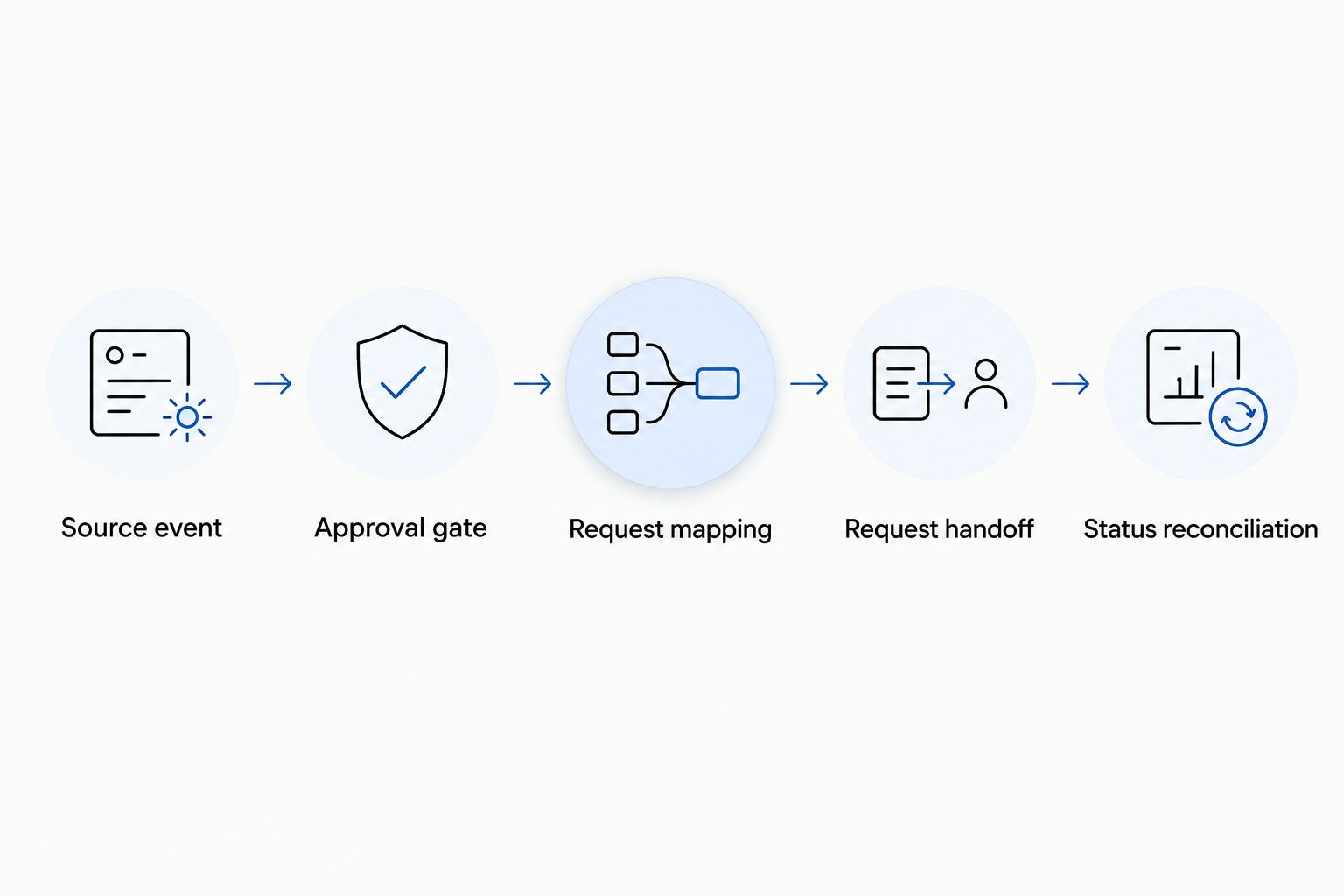
Status reconciliation and delivery records
Your inventory workflow needs usable transport information, but not every transport update belongs in an inventory field. Decide where staff will read updates before attempting automatic writeback.
- Agree on status meanings. Define how your team distinguishes request received, awaiting readiness, pickup arranged, collected, and delivered. These are proposed business milestones, not claims about either platform's available status labels.
- Identify the update source. Confirm how the transport coordinator will provide shipment updates and which updates the integration can receive. Do not assume a callback, polling endpoint, or inventory writeback capability exists.
- Keep an authoritative movement record. Store the transport reference beside the dealership's movement identifier. If writeback is unsupported, use the approved transport record or internal work queue rather than forcing updates into an unrelated field.
- Close against delivery evidence. Record receipt and delivery documentation through the agreed process. Review condition notes and exceptions before marking the dealership task complete.
Expected result: staff can trace the move from approval to delivery without confusing inventory status with physical custody. Your 2026 operating instructions should identify who resolves conflicting updates and where the final record lives.
When an approved move changes
A useful second workflow handles changes to an existing movement rather than creating another request. This is a process variant; automated change submission still requires confirmed interface support.
- Match the change to the existing movement identifier and transport reference.
- Compare the revised route, vehicle condition, transport type, release date, and receiving instructions with the approved request.
- Send material changes back to the authorized employee for review.
- Notify the transport coordinator through the agreed change process and request confirmation before treating revised arrangements as accepted.
A changed destination is not merely an inventory edit once transport coordination has started. It needs operational review. Likewise, a vehicle that no longer operates needs its handling requirements reassessed rather than a silent field update.
Expected result: an authorized revision updates the existing movement record without generating a competing shipment request. Preserve the original instructions and the accepted revision so staff can resolve disagreements.
Troubleshooting
The same vehicle generates duplicate requests
Match records by authorized movement, not just VIN or alert timestamp. Check for an existing request before creating another, and reconcile uncertain submissions before retrying. A vehicle can legitimately move again later, so VIN-only duplicate blocking is also too broad.
The request arrives, but pickup cannot be arranged
Review release authorization, vehicle readiness, site hours, access, and handling details. Return the movement to the readiness queue if those facts are incomplete. Do not keep advancing the request merely because its required software fields were populated.
An update appears to erase a newer instruction
Keep the source event time and the time your workflow received the event. Compare the incoming change with the current approved movement record, and send conflicts for review rather than overwriting accepted instructions automatically.
The integration stops receiving information
Check the confirmed access method, permissions, authentication, and receiving process with the responsible technical owner. Use a documented staff-reviewed fallback while the issue is resolved. Reconcile pending movements before restoring automated submission.
Customize your workflow
Start your 2026 rollout with a clearly bounded movement process, then expand after staff can reconcile requests and exceptions. Separate dealer trades from auction collections when their release checks or responsible contacts differ.
For an auction-focused branch, use the Manheim auction-win-to-dealer-lot workflow to structure the operational discussion. Its role is to clarify collection and receiving requirements, not to establish software compatibility.
Agree with CHD on the supported request and status workflow before assigning development work. Bring your source-access method, proposed field mapping, approval rules, and exception ownership to that discussion.
Discuss a transport integration
Review your dealership’s request handoff, approval rules, and shipment-status requirements.
FAQ
Can I connect vAuto alerts directly to transport scheduling?
Use a direct automated connection only after your software provider and transport partner confirm the supported interface and workflow. Keep an approval and release-readiness gate between the inventory event and the transport request.
Does CHD have a native vAuto connector?
A native vAuto connector is not established by CHD’s stated API and white-label offerings. Confirm the specific source access, supported actions, and integration scope before planning implementation.
What information should an inventory alert send for transport?
The transport handoff should identify the vehicle, actual pickup and delivery locations, site contacts, operating condition, transport requirements, and requested timing. Include the approved movement reference and release instructions.
Should every inventory update create a shipment request?
No. Only an authorized movement that passes the readiness review should create a transport request. Route other inventory updates to review or leave them outside the transport workflow.
Can transport status automatically update my inventory system?
Automatic inventory writeback requires confirmed support and permission in the agreed integration. If writeback is unsupported, keep transport references and updates in an approved movement record or staff work queue.
How do I stop duplicate transport requests?
Assign a distinct identifier to each authorized movement and check for an accepted request before retrying. Link later changes to that movement rather than creating a new shipment from every alert.
Does an accepted request mean pickup is scheduled?
No. Request acknowledgment, carrier assignment, and confirmed pickup arrangements are separate milestones. Record each distinctly so dealership staff do not mistake successful data transfer for a collection commitment.
One last thing
A VIN identifies the vehicle, not the move. The same vehicle can travel from an auction to a dealership and later between dealership locations. Give each authorized movement its own reference so an old alert cannot reopen a completed shipment or overwrite a new route.
Related guides
- Auto transport for independent dealers
- ADESA auction-buy-to-showroom-ready workflow
- Auto transport for remarketing companies